02 · Own product · Product
UXAtom Speed
UXAtom Speed (opens in a new tab) is my own product: a free speed test and site audit that tells you what to fix first, and how, on the platform your site runs on.
- Checks in one report
- 100+Checks in one report
- Platforms and hosts detected
- 60+Platforms and hosts detected
- Free single-check tools
- 29Free single-check tools
- Designer
- Mohin Uddin
- Role
- Product, UI/UX Design, Engineering
- Timeline
- Own product · Free during beta
- Technology
- Nuxt, Vue, Cloudflare, Gemini, PageSpeed API
- My own productlive and in use
- Real screensfrom the live product
- Designed and built by me
My role
- The product, the UX, the front-end, the checks behind it and the AI fixes.
Key result
0
Sign-ups or upsells between a URL and the full report
At a glance
- 01 · The problem
Speed tools give you a score, not a next step.
Read the problem - 02 · The approach
One scan, every check, and the fix right next to each problem.
See the approach
01 · Context
UXAtom Speed is a free website speed test and site audit, with AI fixes.
- Paste a URL, pick mobile or desktop, and in about 30 seconds a report of 100+ checks fills in, section by section.
- Free during beta, with no sign-up: 60 AI fixes and 10 AI design reviews a day.
02 · Problem
Speed tools give you a score, not a next step.
- Reports are written in metric names, not in what a visitor feels.
- Advice is generic, not for the platform the site actually runs on.
- Speed is only one part: SEO, security, links and email setup live in other tools.
03 · Thinking
One scan, every check, and the fix right next to each problem.
- Rank every issue by how much it helps, so the first fix is the biggest one.
- Detect the platform first, so a fix is written for WordPress, Shopify, Nuxt or whatever runs the site.
- Explain each metric in plain words, with what good looks like: LCP of 2.5 s or less, CLS of 0.1 or less.
04 · Design
A report that reads top to bottom: verdict, priorities, then proof.
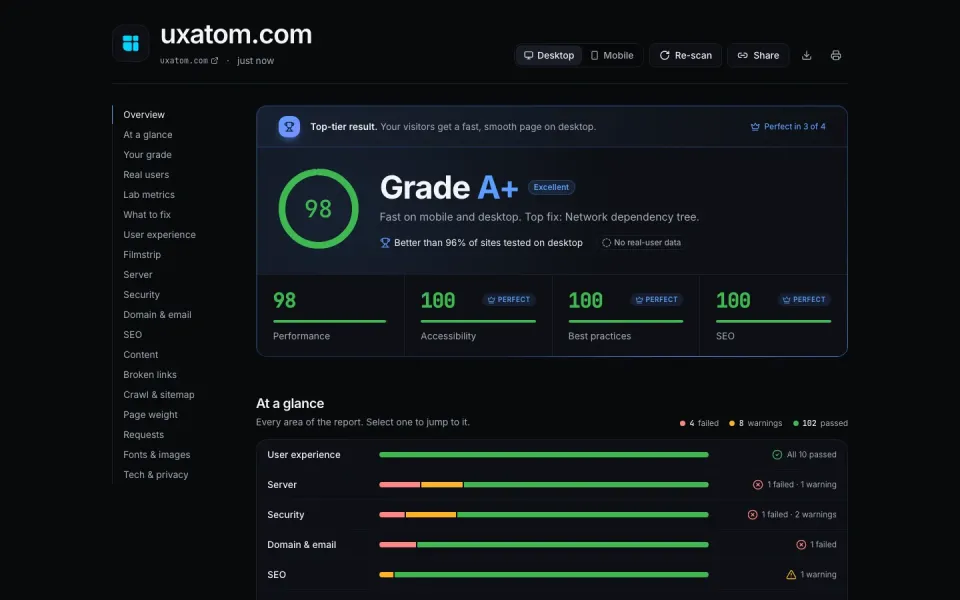
- It opens with one plain sentence, like “Top-tier result. Your visitors get a fast, smooth page”, before any number.
- At a glance shows every area as one bar of failed, warning and passed checks, and each bar jumps to its section.
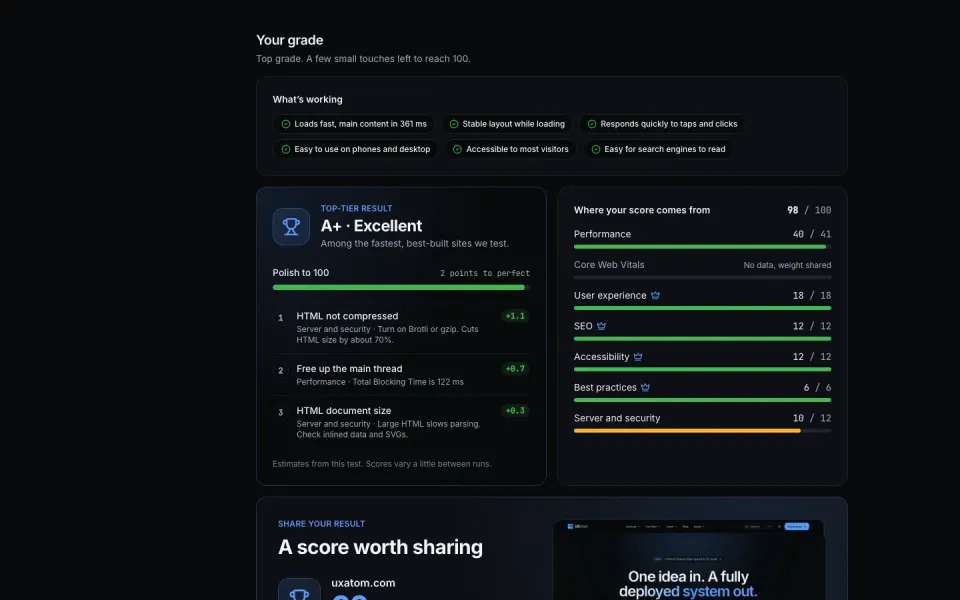
- Polish to 100 lists the fixes in order, each with the points it adds; the weights behind the score are on screen too.
- The homepage lets people feel the metrics: LCP, INP and CLS on a slow and a fixed page, and a button to tap.
- The problem
- A score alone doesn’t tell a site owner whether the site is good, or what to do next.
- What the UI does
- One plain sentence first, then the grade, how it compares with other sites, four scores and every area at a glance.
- Why it matters
- People know where they stand in one line, then go as deep as they want.
Report
01
A verdict before the numbers
Problem: A score alone doesn’t tell a site owner whether the site is good, or what to do next.
The UI: One plain sentence first, then the grade, how it compares with other sites, four scores and every area at a glance.
People know where they stand in one line, then go as deep as they want.
02
Know what to fix first
Problem: Audit tools list dozens of issues with no order, so people fix the easy ones, not the ones that matter.
The UI: Polish to 100 ranks the fixes and shows the points each adds, next to where the score comes from.
The first fix is always the one that helps most.
03
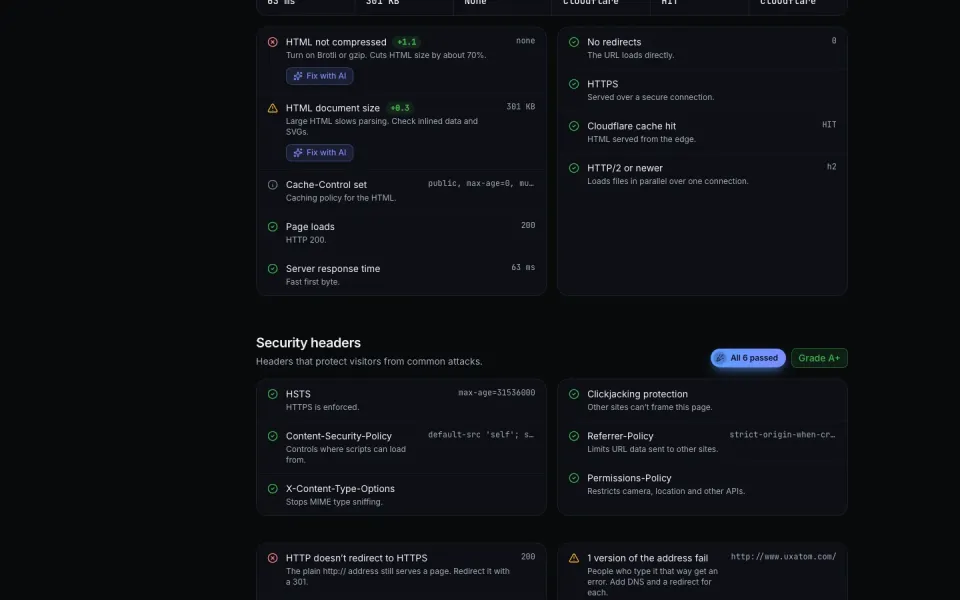
Server and security, in plain words
Problem: Headers, redirects and compression are invisible to most site owners, and named in jargon.
The UI: Each check in one sentence with the value measured, and Fix with AI next to anything that failed.
Non-experts can act on issues they couldn’t even see before.
04
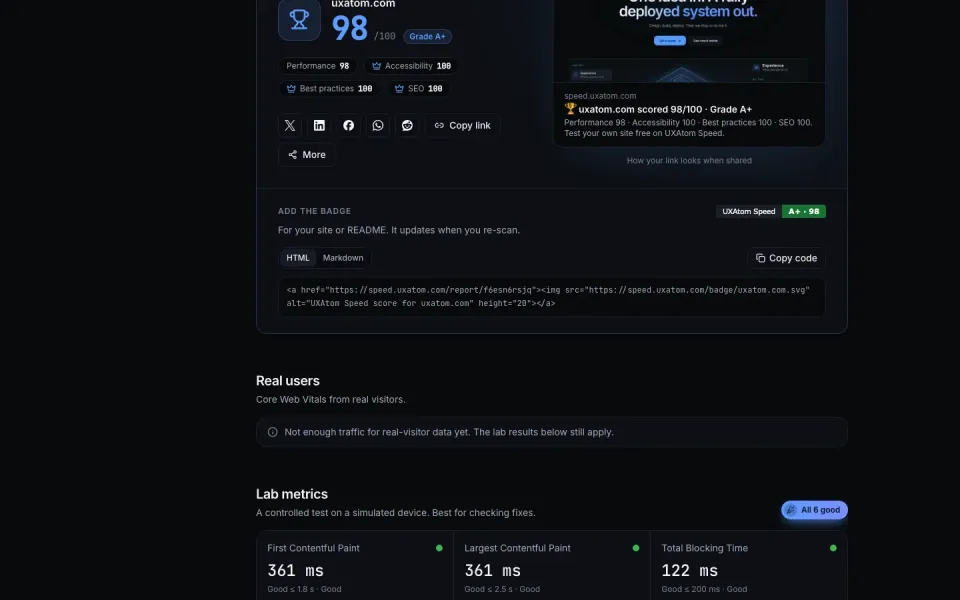
A result worth sharing
Problem: A good score usually stays in one person’s browser tab.
The UI: A share card, a link preview and a badge for the site or README that updates on every re-scan.
Every shared report is the next visitor’s way in.
Homepage
01
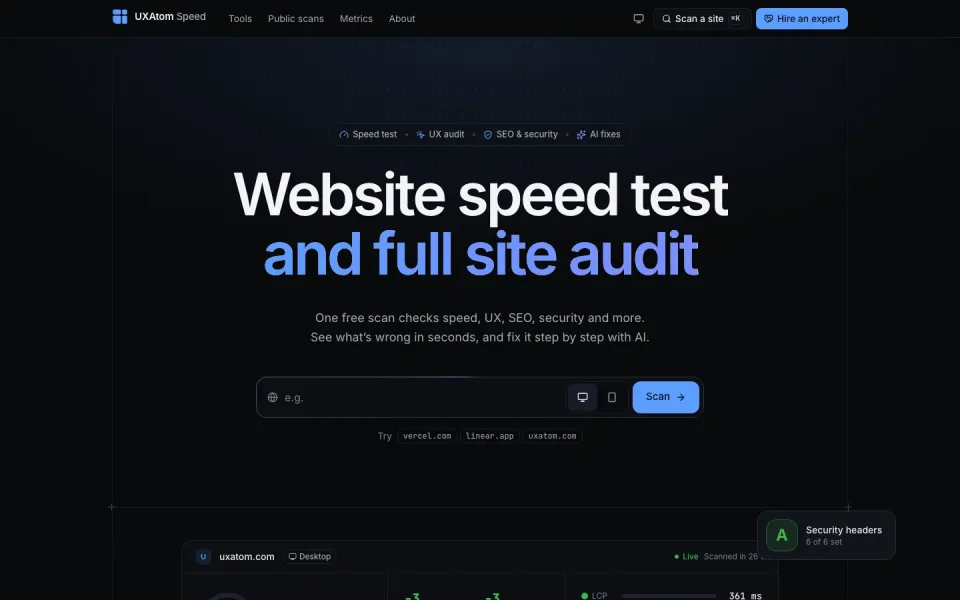
Start from the question
Problem: People arrive with one question: is my site fast, and why not?
The UI: One address box, mobile or desktop, sample sites to try, and 29 single-check tools for narrower questions.
Nothing stands between the question and the answer: no sign-up, no setup.
05 · Build
Lab data, field data and its own checks, in one report.
- Lab tests come from Google Lighthouse through the PageSpeed Insights API; field data from the Chrome UX Report.
- Its own checks cover DNS, SPF, DKIM and DMARC, certificates from Certificate Transparency logs and domain dates from RDAP.
- AI fixes and design reviews run on Google Gemini only when someone clicks, and the answer is saved with the report.
- A polite bot: it names itself, tests about 30 links and 35 sitemap pages, and never crawls a whole site.
06 · Growth
Free where people search, and a clear next step when they need help.
- 29 single-check tools and public scan pages meet people at the exact question they search for.
- Share cards and a README badge turn each good score into a link back to the product.
- Each report offers “Hire an expert” for site owners who want the fixes done for them.
- A Pro plan for teams and agencies is on a waitlist: monitoring with alerts, before-and-after comparisons, private PDF reports and team sharing.
07 · Reflection
Being honest about AI made it more useful, not less.
- AI only runs on click, and the report says it can be wrong: test changes on a staging copy first.
- The 29 single-check tools let people start with the one question they came with.