03 · AppsCode · Product Design
ACE Console
The ACE Console is where teams bring Kubernetes clusters from any cloud under management and run them as one fleet. I own its UI: the information architecture, every flow and screen, and the Vue code behind them.
- Cloud providers to import from
- 8Cloud providers to import from
- Ways to bring a cluster in
- 4Ways to bring a cluster in
- Hub to run many clusters as a set
- 1Hub to run many clusters as a set
- Designer
- Mohin Uddin
- Role
- Product Design, Information Architecture, UI Engineering
- Timeline
- AppsCode · ongoing
- Technology
- Vue 3, Nuxt, Tailwind CSS v4, Figma, AppsCode Design System
- Shipped at AppsCodein production consoles
- Real screenssensitive values blurred
- Design and UI code by meAPIs by the engineering team
My role
- I own the console’s UI end to end: the information architecture, the flows, every screen and state, and the Vue UI code, built on the design system I made.
- Me, with 3–4 engineers who connect the APIs and data
- Ongoing, day by day, across my 7 years at AppsCode (opens in a new tab)
At a glance
- 01 · The problem
Running Kubernetes across clouds meant a terminal, a pile of kubeconfigs and installers run by hand on every cluster.
Read the problem - 02 · The approach
Six rules I design every console screen by.
See the approach - 03 · The result
One console now takes a cluster from any cloud to a managed fleet.
See the result
01 · Challenge
Running Kubernetes across clouds meant a terminal, a pile of kubeconfigs and installers run by hand on every cluster.
- Teams work across several organisations and dozens of clusters, so the costly mistake is the right command on the wrong cluster.
- Getting a cluster ready meant installing platform components, a GitOps engine, licences and operators, in the right order, one cluster at a time.
- Nobody could see the whole fleet at once: which cluster was disconnected, not ready or waiting on an upgrade.
BeforeOne cluster, by hand
kubectl config get-contexts
kubectl config use-context prod-eu-1
helm repo add appscode https://charts.appscode.com/stable
helm install ace appscode/ace -n kubeops \
  --create-namespace -f values.yaml
flux install
kubectl get pods -A | grep -v RunningAfterAny cluster, in the console
Add cluster
  1  Provider      EKS · AKS · GKE · DOKS · …
  2  Credential    stored once, reused
  3  Cluster       picked from the provider’s list
4 Import checked first, progress streamed live02 · Users
Three kinds of people share this console, and each arrives with a different question.
Platform engineers
Connect clusters, choose which platform features run on them, and set limits and defaults for everyone.
What got in the way Installing and wiring operators on each cluster by hand, then watching versions drift apart.
DBAs
Create and run production databases and their day-2 operations.
What got in the way Needing cluster access and the right kubeconfig before they could even start.
DevOps and SREs
Deploy apps, read workloads and events, open terminals and review security reports.
What got in the way Checking clusters one by one to find the one in trouble.
03 · Thinking
Six rules I design every console screen by.
- They come from the users: engineers who notice everything, working where one wrong click can reach production.
- The same rules run across the consoles, so a habit learned in one works in the others.
Rule 01
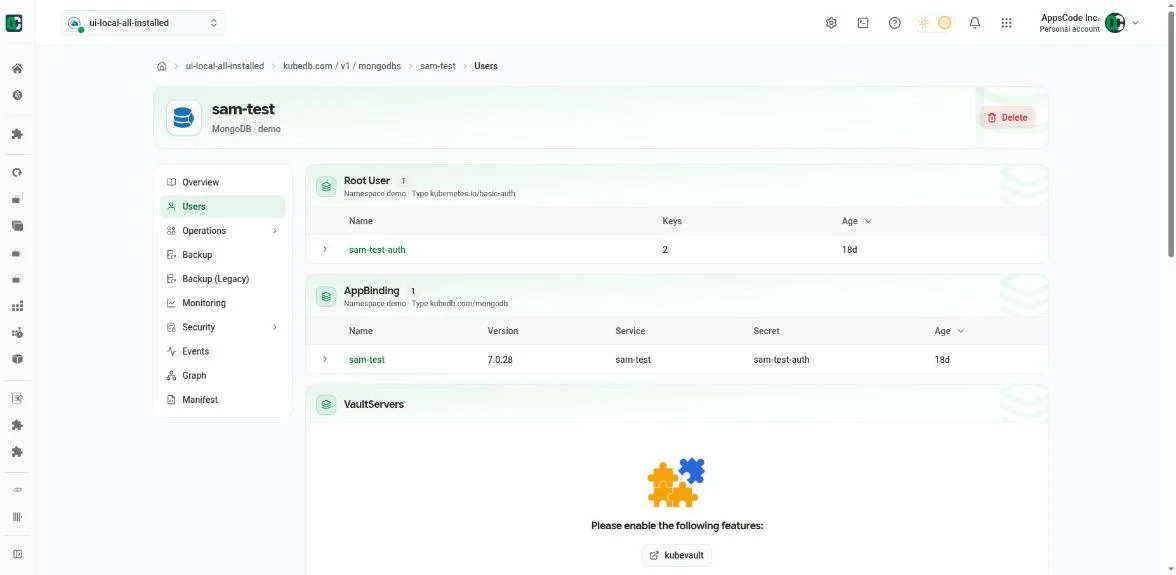
When a page can’t work yet, it says why and offers the fix.
- Database consoleNo cluster, a cluster that isn’t ready, or KubeDB (opens in a new tab) not enabled: each state names the cause and links to the page that fixes it, instead of showing an empty list.
- Database consoleWhile there is nothing to act on, the sidebar, Create and Terminal stay hidden, so nothing invites a click that can’t work.
- Cluster consoleA database’s Users tab names the missing KubeVault (opens in a new tab) feature and links straight to it.
- Platform consoleWhen a session expires, people sign in again and land back on the page they were on.
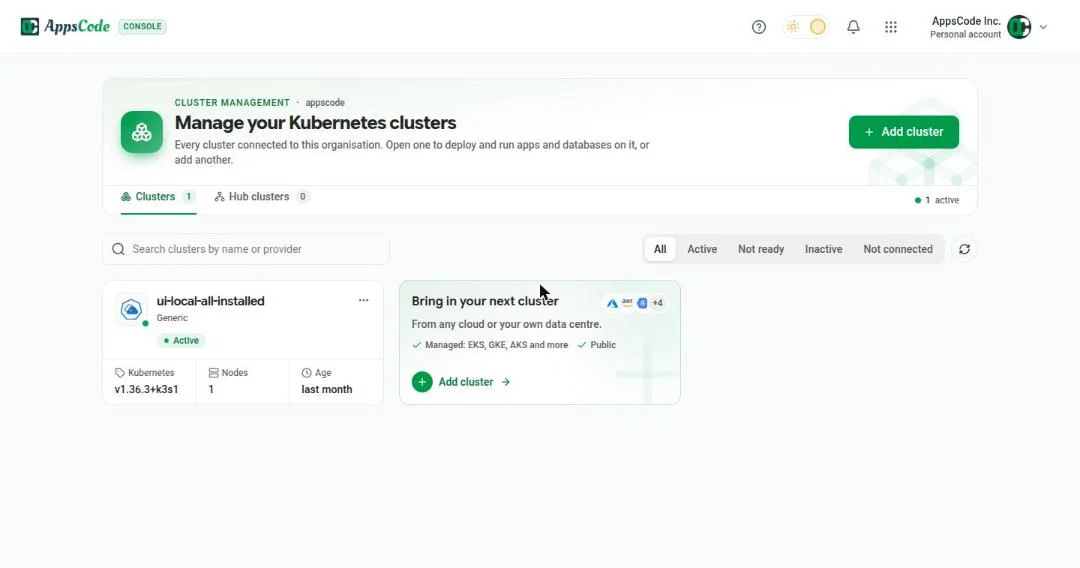
04 · Fleet
The home page answers one question first: is anything wrong across my clusters?
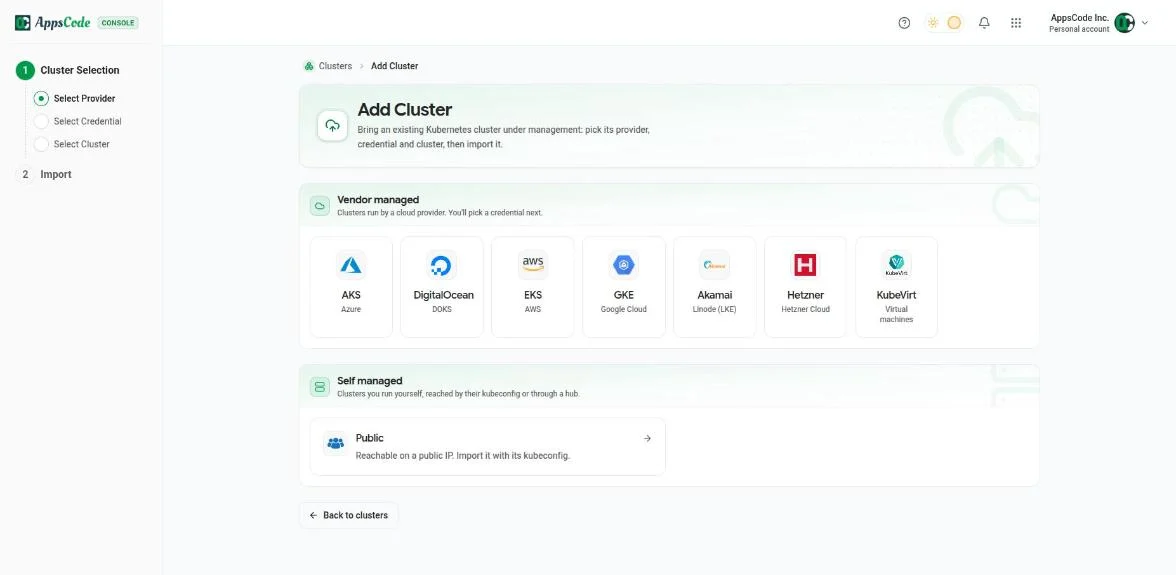
05 · Onboarding
Adding a cluster is one guided flow that checks the cluster before it installs anything.
- Four paths: import from a cloud account, create a new cluster, paste a kubeconfig, or reach a private cluster through a hub.
- Credentials are stored once and reused, so provider keys aren’t pasted again for every import.
- The wizard installs what’s missing and streams each step live, so every cluster ends up configured the same way.
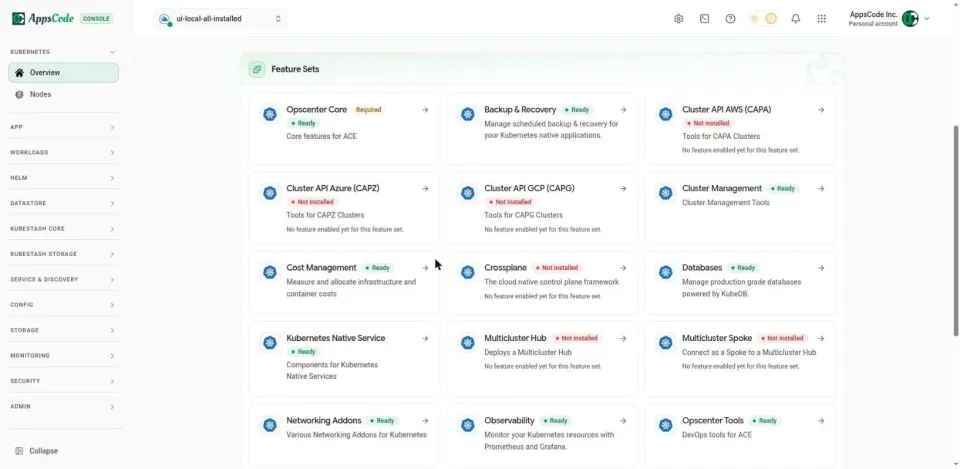
06 · Features
Platform features are switched on per cluster as tested sets, and each card says whether it still works.
- Databases, backup, observability, cost and security arrive as feature sets with tested versions and defaults.
- Reconcile and Convert to UI Managed bring drifted or hand-installed features back under the console’s control.
- On a spoke cluster the console points people to the hub, so a fleet is changed from one place.
07 · Control
Risky actions ask first, and admins decide once how a cluster behaves for everyone.
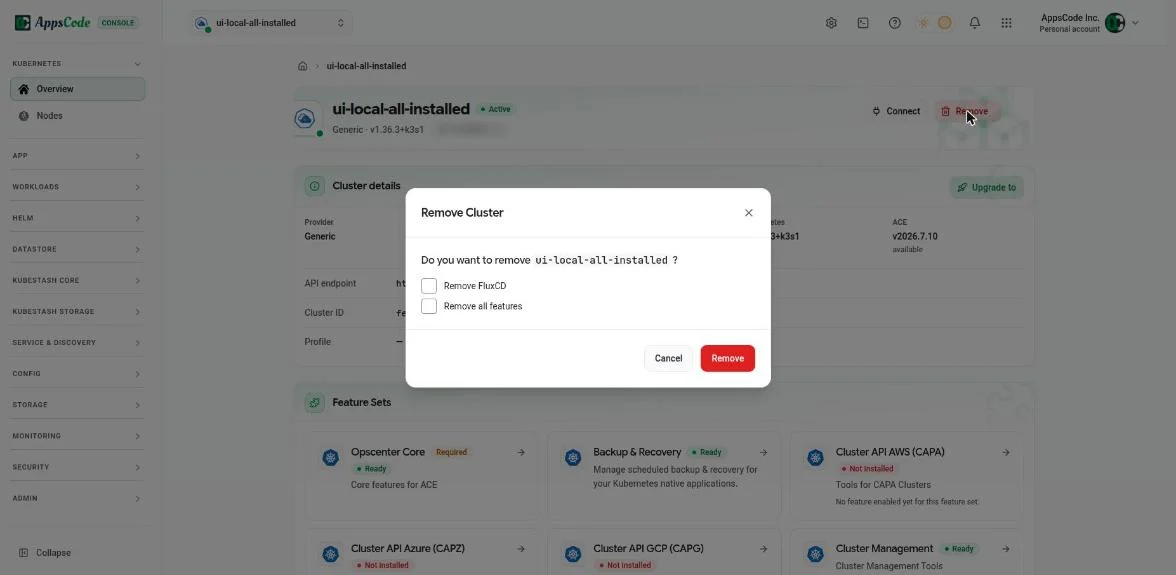
- Removing a cluster asks what to clean up first, then streams each step until it’s done.
- Permissions hide what a member can’t do, and a missing permission reads as a reason, not as a broken button.
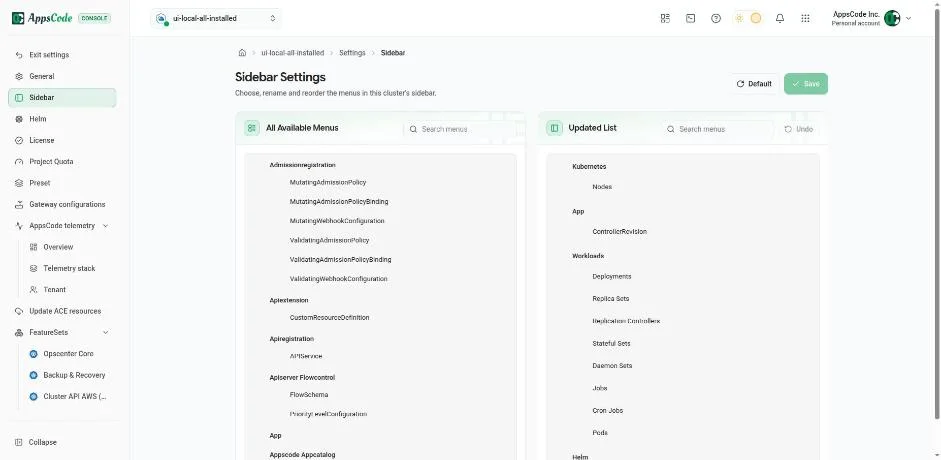
- Sidebar, presets, quotas and licences are set once per cluster, for the whole team.
08 · Scale
When one cluster becomes dozens, a hub runs them as groups.
- A hub groups spoke clusters into sets, and feature sets, versions and access apply to a whole set at once.
- A set’s overview counts the clusters on the current version, out of date and unaligned, and explains each difference.
- Private clusters with no public IP join through the hub, so the console can reach them at all.
09 · Outcome
One console now takes a cluster from any cloud to a managed fleet.
- Clusters come in from 8 providers or a kubeconfig through one guided flow, and each ends up configured the same way.
- The fleet’s state is visible on one page, and risky actions explain themselves before they run.
- The same shell, design system and rules carry into the database and platform consoles, so a habit learned here works there.
- What I learned: on infrastructure, the design people value most is the one that stops the wrong action on the wrong cluster.
From the person who managed this work
“Mohin is not only a talented UI/UX engineer, but also a team player and communicator. He used various tools and methods to conduct user research, create wireframes and prototypes, test usability, and implement feedback.”