01 · AppsCode · Product Design
KubeDB Console
KubeDB (opens in a new tab) runs production databases on Kubernetes, and it’s AppsCode (opens in a new tab)’s busiest product. Its console is where teams create those databases and keep them healthy. I own its UI: the structure, every flow and screen, and the Vue code behind them.
- Deploy support issues, down from about 20–25
- ≈0Deploy support issues, down from about 20–25
- Database engines, one structure
- 25+Database engines, one structure
- Operations on every database page
- 12Operations on every database page
- Designer
- Mohin Uddin
- Role
- Product Design, Information Architecture, UI Engineering
- Timeline
- AppsCode · ongoing
- Technology
- Vue 3, Nuxt, Tailwind CSS v4, Figma, AppsCode Design System
- kubedb.com (opens in a new tab)live product
- Real screenssensitive values blurred
- Design and UI code by meAPIs by the engineering team
- Case study PDF (opens in a new tab)two pages, to share
My role
- I own the console’s UI end to end, from research to the Vue UI code: how 25+ engines share one structure, the create wizard, the database page and every operation. I also act as its product owner, setting priorities with the CEO and the platform team.
- Me, with 3–4 engineers who connect the APIs and data
- Ongoing, day by day, across my 7 years at AppsCode
At a glance
- 01 · The problem
A production database on Kubernetes meant a long manifest, the right versions and quotas, and no second chance when an upgrade went wrong.
Read the problem - 02 · The approach
Twenty-five engines, one structure: each decision rests on a UX principle I could defend.
See the approach - 03 · The result
Teams now create and run production databases from the browser, and every change is previewed and recorded.
See the result
01 · Challenge
A production database on Kubernetes meant a long manifest, the right versions and quotas, and no second chance when an upgrade went wrong.
- Every engine has its own versions, modes and settings, and one wrong field only shows up after the database is running.
- TLS, backups and monitoring were separate objects to wire by hand, so they were easy to forget.
- Day-2 work like upgrades, restarts and resizing is where outages happen, and none of it showed who changed what.
- The result was a steady flow of support issues about routine work: about 20–25 on deploying databases alone.
BeforeA MongoDB replica set, by hand
apiVersion: kubedb.com/v1
kind: MongoDB
metadata: { name: sam-test, namespace: demo }
spec:
  version: "7.0.28"
  replicaSet: { name: rs0 }
  replicas: 3
  storage: { … }
  tls: { issuerRef: { … } }
  monitor: { agent: prometheus.io/operator }
# + BackupConfiguration, Repository,
# RetentionPolicy, ServiceMonitor …AfterThe same database, in the console
Create MongoDB
  1  Namespace and name
  2  Version and mode     only valid ones
  3  Machine and storage  checked against quota
  4  Monitoring · Backup · TLS · Gateway
5 Preview every file, before submit02 · Users
The console serves the people who run databases and the people who only need to use one.
DBAs
Create production databases and run their upgrades, scaling, backups and restores.
What got in the way Writing and checking manifests by hand, with nothing to preview before an upgrade.
App developers
Get a database for their service, connect to it and check it’s healthy.
What got in the way Digging through Secrets and Services just to build a connection string.
Platform admins
Decide which versions, sizes and options teams may choose, and who can change what.
What got in the way Databases created outside the team’s standards, found only after they caused trouble.
03 · Research
Before designing, I looked at where database work actually went wrong.
- People didn’t need every YAML field. They needed a few common jobs done safely: create, scale, upgrade, back up, restore, monitor, fail over.
- They needed to see at a glance whether a database was healthy.
- When something broke, the slow part was finding the right logs or shell, not the fix itself.
04 · Thinking
Twenty-five engines, one structure: each decision rests on a UX principle I could defend.
Rule 01
Guided forms, not YAML
Recognition over recall: people pick from the versions and modes an engine supports, within the team’s presets and quota, instead of remembering field names.
Rule 02
Few choices per step
Hick’s law and progressive disclosure: sensible defaults first, advanced options folded away for the experts who need them.
Rule 03
One shape for every engine
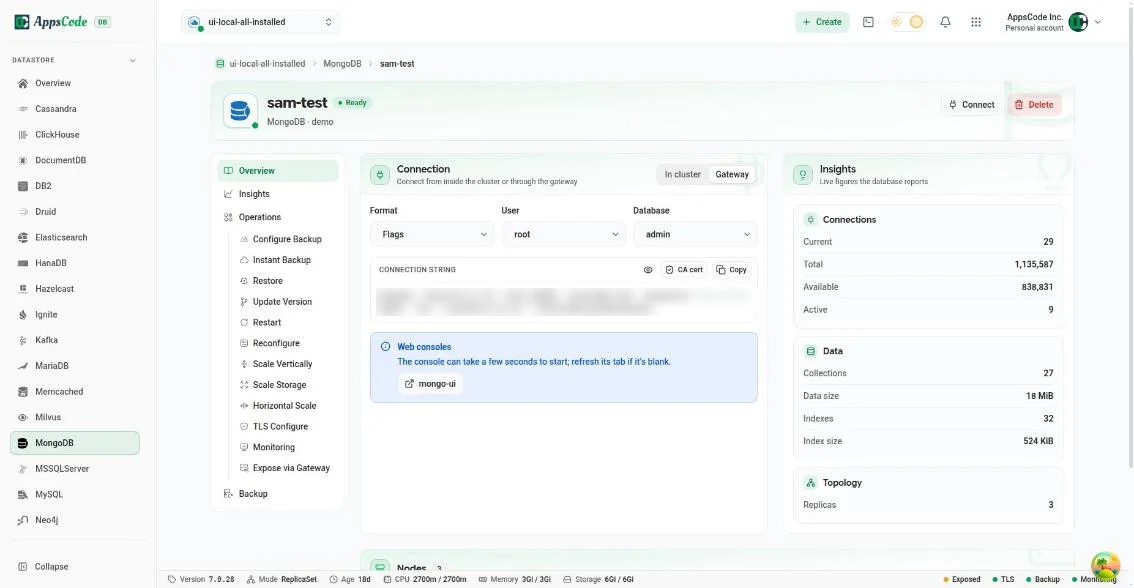
Jakob’s law: Postgres, MongoDB or Kafka, every database has the same page, menu and operations, so learning one teaches all of them.
Rule 04
Status first
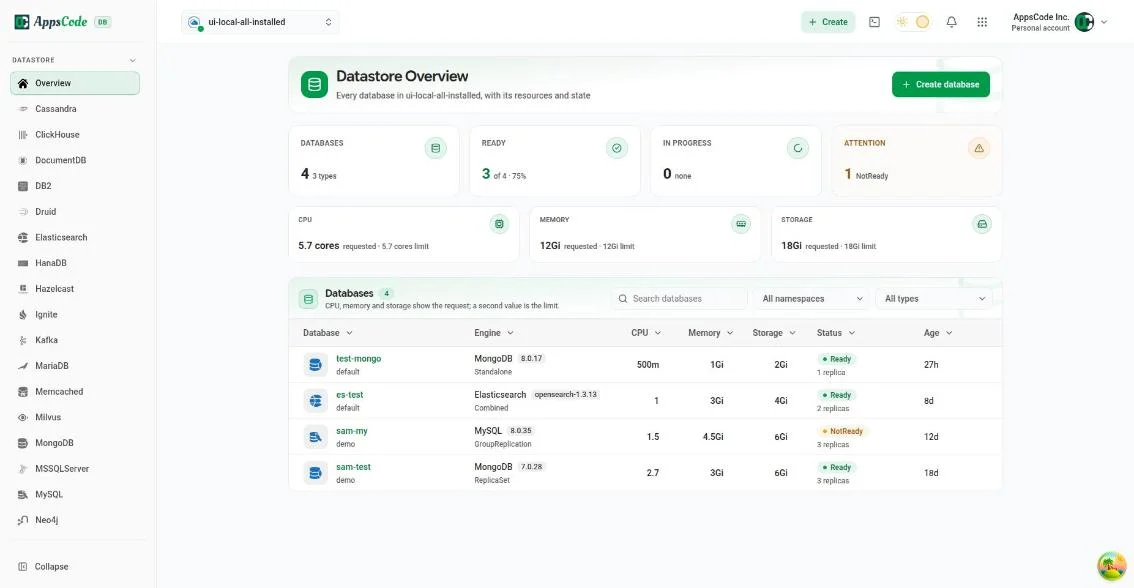
Visibility of system status: overviews lead with the databases that need attention, and each state names its cause.
Rule 05
One click to logs or a shell
Shorten the critical path: the slowest part of an incident is getting to the right place, so every node has Logs and Exec beside it.
Rule 06
Preview, then change
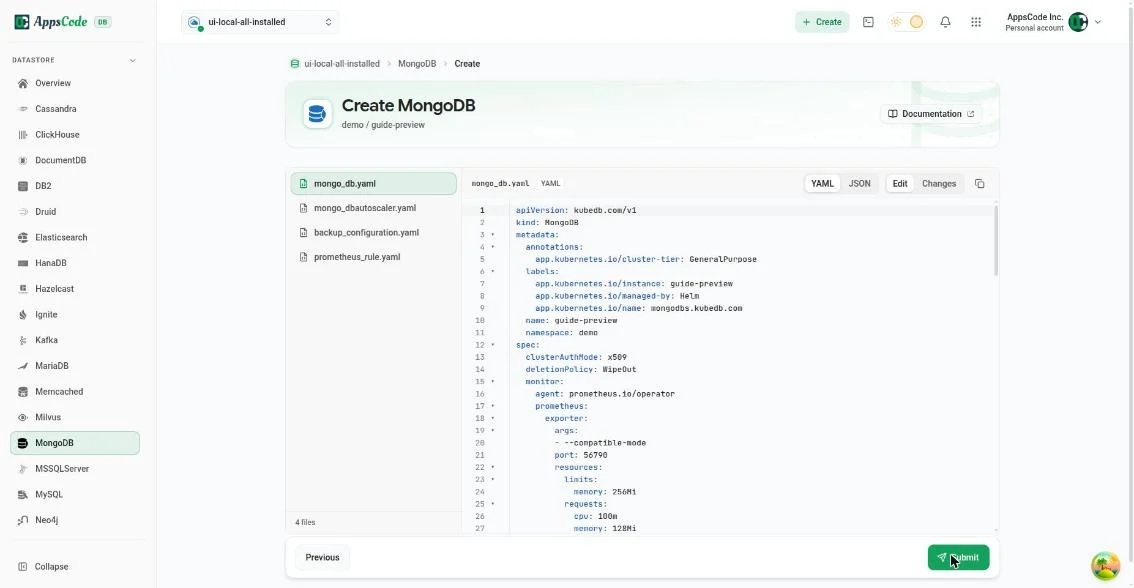
Error prevention: creating a database and every operation on it end with a preview of exactly what will be applied, in plain words.
05 · Overview
One page answers “which databases do we run, are they healthy, and what do they use?” across every engine.
06 · Create
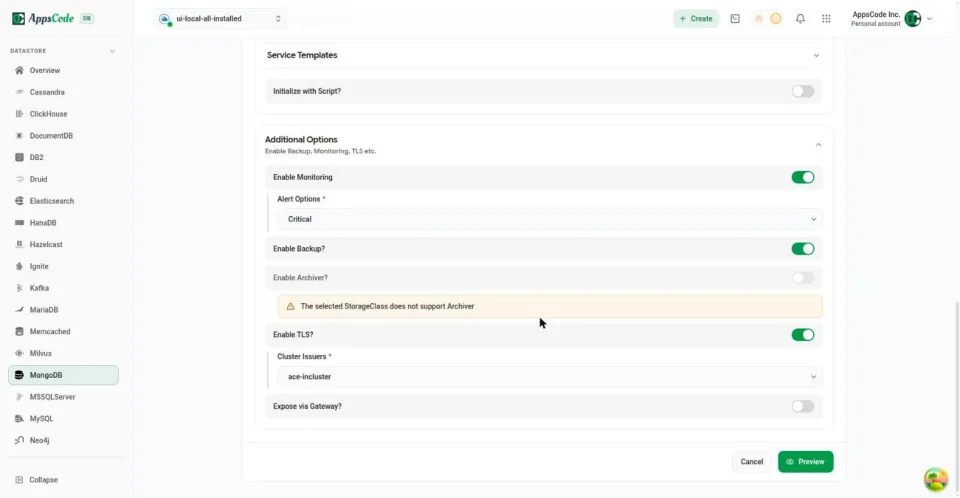
The create wizard asks only the questions that matter, and checks the answers before anything is applied.
- It starts from the organisation’s presets, so every new database follows the standard without anyone remembering it.
- Monitoring, backup, TLS and gateway access are switches on one step, and a switch that can’t work says why.
- The last step shows every file the wizard will create, and nothing is submitted until then.
07 · Database
Everything about one database is on one page, and the vital facts never scroll away.
08 · Operations
Upgrades, restarts and resizing are where outages happen, so each one runs as a reviewed, tracked request.
- Each operation shows the current and new values side by side, then a preview, before anything runs.
- KubeDB carries it out safely, one node at a time, and the Operations tab records every change.
- Recommended updates wait for approval and can be scheduled into a maintenance window.
- Restore and an instant backup sit in the same menu, so a backup before a risky change is one click.
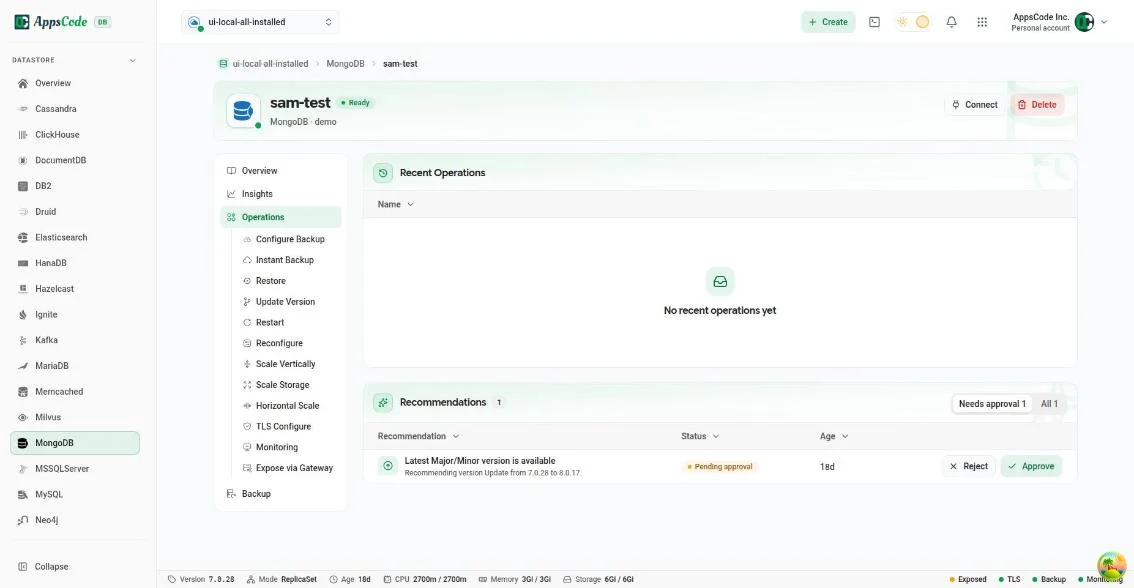
Operations: recent changes, and a recommended version update waiting for approval 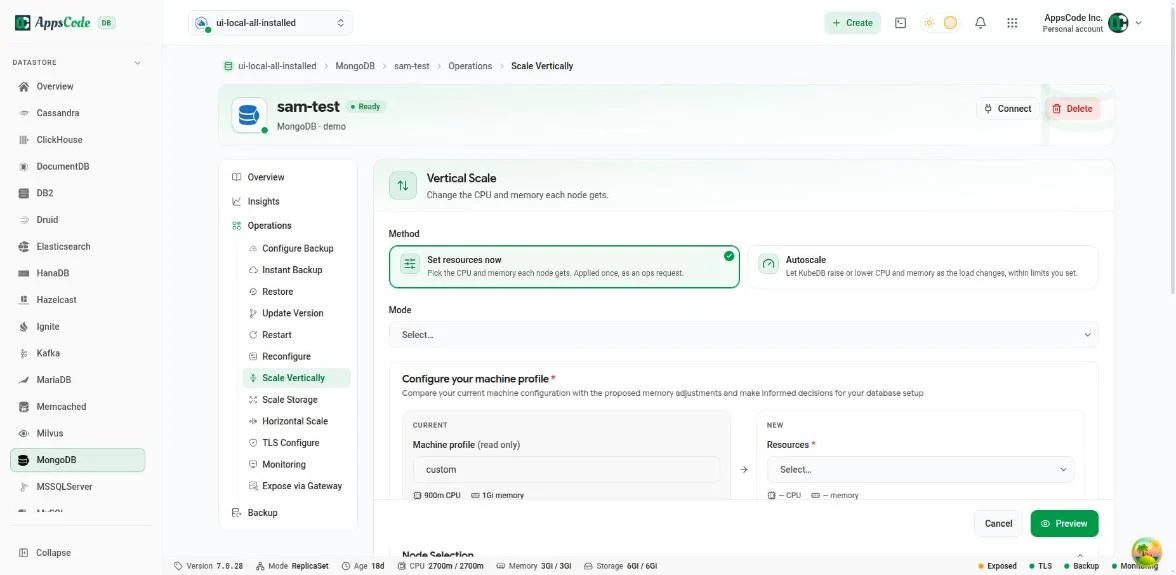
Vertical Scale: current and new resources side by side, applied as a tracked ops request 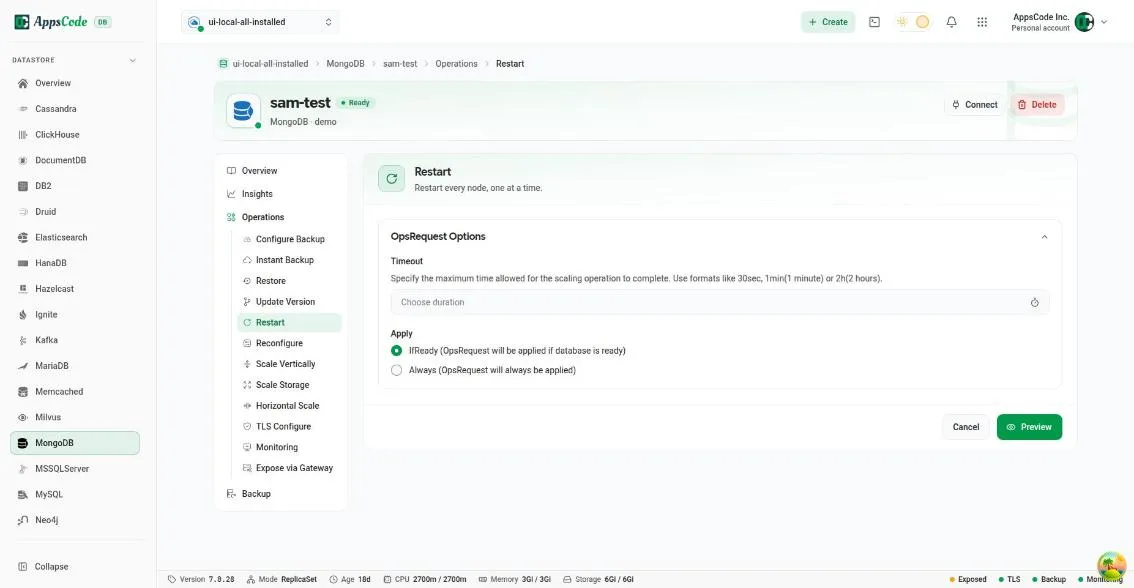
Restart: every node, one at a time, applied only once the database is ready 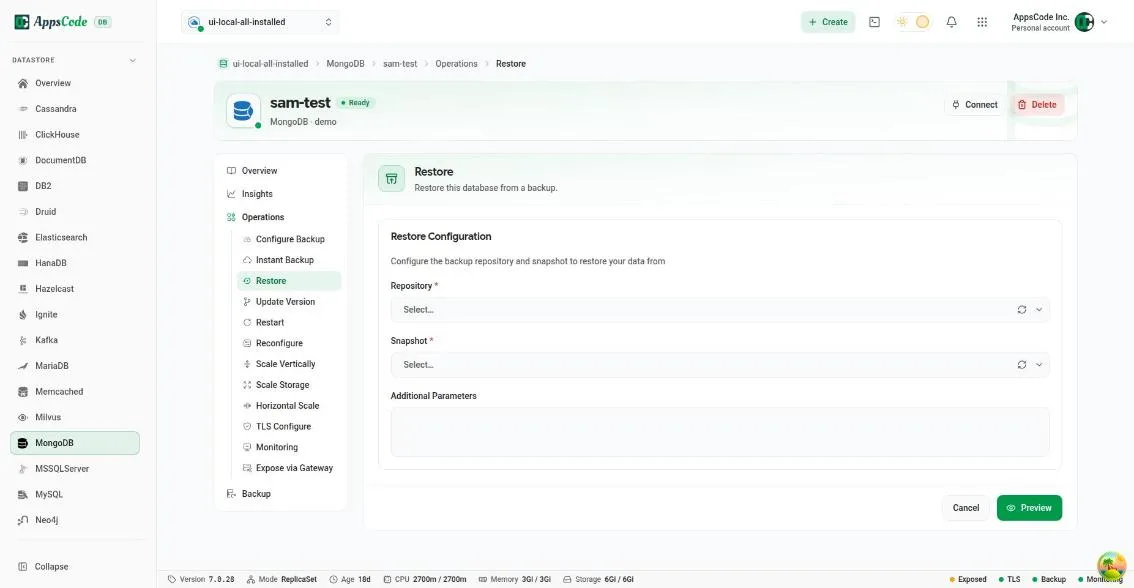
Restore: pick a repository and a snapshot, then preview before anything changes
09 · Outcome
Teams now create and run production databases from the browser, and every change is previewed and recorded.
- Support issues about deploying databases fell from about 20–25 to almost none, which freed the support and platform teams for harder problems.
- Create, scale, monitor, back up, restore and fail over moved from the terminal into the browser.
- 25+ engines share one structure, so adding an engine doesn’t mean designing a new console.
- What I learned: with data at stake, trust comes from showing exactly what will happen before it does.
10 · Next
Fewer tickets is a good sign, but I want to measure the flows directly.
- Add simple product analytics to the key flows, to see task completion and drop-off for each operation.
- Run a short usability round on restore and failover, where mistakes cost the most.
From the person who managed this work
“Mohin is not only a talented UI/UX engineer, but also a team player and communicator. He used various tools and methods to conduct user research, create wireframes and prototypes, test usability, and implement feedback.”